
On this page · 11 sections
- First, find out where the minute goes
- New users were stuck behind a refresh job
- From "ask more often" to long polling
- A flag instead of a new program
- The bug review warned us about
- Squeezing out the rest
- What to show people during those 14 seconds
- Results
- Who did the work
- If your users wait too
- Related
A new user connected a repository to Orbi Cloud. The page said "preparing your workspace". They waited a while, then left.
When they left, the workspace was already ready. The page only refreshed every 10 seconds and hadn't told them yet.
I started digging that night. Claude Code, the AI assistant I plan work with, told me preparing a workspace took "about five minutes". I said five minutes is long enough to install an operating system.
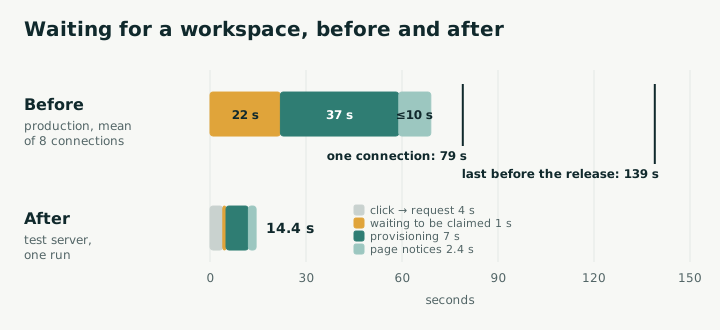
It turned out to be about a minute on a normal day and over two minutes on a bad one. One night later, on our test server, it was about 10 seconds. The fix was 31 tickets; Orbi wrote the code for every one, reviewed it and merged it (Orbi is what I'm building: a lights-out software factory that takes an Issue to a release without anyone watching). Along the way we hit a bug that review had warned us about, which we'd decided wasn't worth fixing. It bit us the same evening.
Two pieces matter for the rest of the story. Cloud is our website, where users sign in and connect repositories. The host is a machine of ours that runs a sandbox for each connected repository; for security it can only connect outward, so Cloud can never call it directly.
First, find out where the minute goes
We pulled timestamps from the database and split the wait into pieces:
| Step | Roughly how long | Who decides |
|---|---|---|
| The request waits in a queue for the host to pick it up | 20-odd seconds on average, close to two minutes at worst | a job on the host that runs once a minute |
| The host prepares the sandbox | half a minute to a minute | the provisioning script |
| The page notices it's ready | up to 10 seconds | the status page, which refreshed every 10 seconds |
Claude Code had mixed up two things: preparing the workspace took about a minute, and seeing Orbi's suggestions for the repository took over three. "Five minutes" was the second. We went after the first.
We set one more rule that night: time the user spends doing something, like picking a repository, doesn't count as waiting. We only went after the time when they can do nothing but watch the screen.
New users were stuck behind a refresh job
A job on the host ran once a minute. It first refreshed credentials for every existing user's sandbox (GitHub tokens expire after an hour), and only then looked for new users.
One refresh took about a minute and a half, and the runs went back to back. A new request that just missed one run's check had to wait for the rest of that run and then the next run's whole refresh. The more users we had, the longer the refresh, and the longer every new user waited.
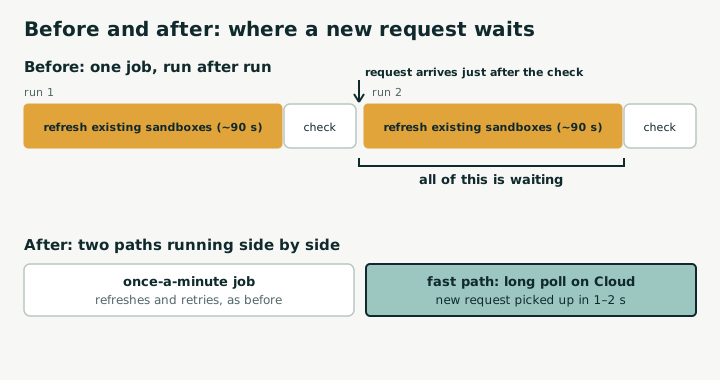
The obvious move was to run the job every 10 seconds instead of every minute. We nearly did. Reading the script showed it would change nothing: the refresh was already running back to back, and new users would still be stuck behind it. The order had to change.
From "ask more often" to long polling
The first idea was to pull "pick up new users" out into its own job that asked Cloud every 2 seconds. That works, but it's still polling. I asked: why isn't this message-based, so the host knows the moment something arrives?
There are three ways to get a request from Cloud to the host:
| Option | How | Verdict |
|---|---|---|
| Short polling, more often | Ask every 2 seconds | Simple, but there's always a delay, and it keeps asking when there's nothing to do |
| Long polling | The host sends a request; Cloud holds it and answers as soon as there's new work, or with nothing after 20 seconds | Picks up new work in about a second, and the host still only connects outward |
| Push | Cloud connects to the host | The host would need an open inbound port, which our design doesn't allow |
We picked long polling. GitHub's self-hosted runners work the same way: the runner holds a 50-second long poll open to GitHub, opens another when it times out, and never needs an inbound connection. Our host is in the same position. It can reach out; nothing can reach in.
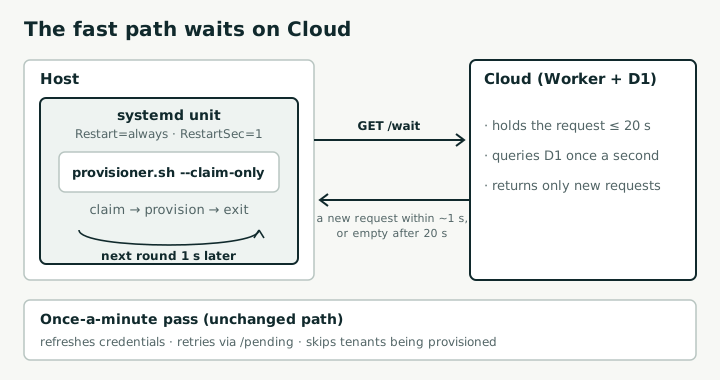
On the Cloud side we added an endpoint that holds the request for up to 20 seconds and checks for new users once a second. It hands out only new requests. Failed ones waiting for a retry stay with the old once-a-minute job, otherwise one small outage could burn through all of a request's retries in a few seconds. Independent review caught that before any code was written.
A flag instead of a new program
The first design added a new resident Python program on the host: loop on the long poll, pick up requests, call the provisioning script. The deploy script would have to learn to enable it the first time and restart it on every update, and it needed its own test suite.
Orbi had already started building that when I asked whether it could be thinner.
Looking again at the existing provisioning script, we didn't need a new program at all. Two copies of it can run at once; the refresh is one block that can be skipped; and the new endpoint returns exactly what the old list did. So the script got one flag, --claim-only: skip the refresh, wait on the long poll instead, and run the same provisioning code as before. One round, then exit.
systemd does the looping. This is the whole unit:
[Unit]
Description=Orbi Cloud provisioning fast claim (long-poll)
# Restarting is the whole point, so turn off the default
# start limit (5 starts in 10 s) that would stop the unit
# during a Cloud outage.
StartLimitIntervalSec=0
After=network-online.target
Wants=network-online.target

[Service]
Type=simple
EnvironmentFile=/etc/orbi-cloud/provisioner.env
ExecStart=/opt/orbi-cloud/host-provisioner/provisioner.sh --claim-only
Restart=always
RestartSec=1

[Install]
WantedBy=multi-user.target
The script exits after every round and systemd starts it again a second later. Each round reads the script fresh from disk, so shipping a new version needs no restart logic; the next round just runs the new code. The one catch: deploy by writing a temporary file and renaming it into place, never by overwriting a script while it's running.
So the first design's new program, its restart logic and its separate test suite never got written.
The bug review warned us about
Once picking up new users moved out of the once-a-minute job, two things ran at the same time. Review found two places where they could collide, at design time.
We fixed one. The other: each user has exactly one model API key, and issuing a new one invalidates the old. Picking up a new user issues a key and hands it to the provisioning script; the once-a-minute job issues a fresh key to every user. If the two land together, the script's key is dead the moment it gets it, and a brand-new user's first attempt ends with "workspace setup failed".
Review's fix was simple: skip users who are being provisioned during the refresh. Claude Code decided that picking up a request now took about a second, so the two would never collide, and left it out of the ticket. I didn't push back.
That evening long polling went live on the test server. The first four new-user test runs passed. The fifth hit exactly that bug. An automatic retry rescued it a minute later. We opened a top-priority ticket, and Orbi merged the fix half an hour after that.
The rule I took from it: when review names a race, either put the fix in the ticket or write a test that proves it can't happen. "It should be fast enough now" is a guess.
Squeezing out the rest
Long polling removed the queue; from then on every request was picked up within a second or two. Other tickets in the same batch shaved the setup itself: Orbi's own program is copied from a prepared directory instead of downloaded, the user's repository downloads while the sandbox is still being built, and the page updates every 2 seconds instead of reloading every 10.
Here's one test run, from the click on "Connect repository": the workspace was ready at 12 seconds, and "Orbi understood your repository" appeared at 26.
What to show people during those 14 seconds
Fourteen seconds is still a bit longer than the 10 seconds people can stay focused, by Nielsen Norman Group's classic numbers. So instead of a spinner the page shows real progress: set up your own workspace, pull your code, install Orbi, start reading your repository, each ticked off with the seconds it took.
There's research behind that. In a 2011 Harvard Business School study on the labor illusion, people picked between two services with identical results: one answered instantly, the other made them wait but showed what it was doing. With a 60-second wait, 63% picked the one that showed its work. When it made them wait without showing anything, only 23% did.
The same paper has a flip side: visible effort followed by a bad result got the worst ratings of all. We'd stepped right into that one. On our Chinese-language page, the "Orbi understood your repository" summary came out in English. Orbi now writes it in the page's language.
Results
| Before | Now (test server) | |
|---|---|---|
| Waiting for the host to pick up the request | 20-odd seconds on average, close to two minutes at worst | a second or two |
| Workspace ready | about a minute normally, over two minutes at worst | about 10 seconds |
| "Orbi understood your repository" appears | didn't exist | about 25 seconds |
| Three suggestions appear | over 3 minutes | about 2 minutes |
The new code is in production now; the production numbers will come when real users connect.
Who did the work
I'm Lawrence Liu, the creator of Orbi. Orbi takes a GitHub Issue labelled ai-ready, writes the change with its coding agent, Pi, reviews it in a separate session, merges it and cuts the release. All 31 tickets in this story went through Orbi that way. Claude Code, the AI assistant I plan work with, wrote the tickets with me and read every change before it merged.
I did three things: decided what mattered; asked two questions, "why isn't this message-based?" and "can it be thinner?"; and let that bug through.
If your users wait too
- Split the wait into pieces and find out who owns each one before you change anything.
- Time the user spends doing something isn't waiting. Go after the time they can only watch.
- Before you make something run more often, look at what's in front of it.
- If your machine can't accept inbound connections, use long polling. Hand out only new work on the fast path and leave retries to the slow one.
- Let systemd be the loop:
Restart=always,RestartSec=1,StartLimitIntervalSec=0, and deploy by renaming files into place. - Treat a race that review names as real until a test says otherwise.
- Show real progress while people wait, and fix results that look wrong before you put them on screen.
Related
Read how Orbi takes an Issue to a release, how writing a request in Orbi Cloud works, the Claude Code comparison, and Cloud.