
On this page · 12 sections
- Why let Orbi write the Issue
- Where to write a request
- While Orbi reads your code
- Request 1: nothing needed to change
- Request 2: what a draft looks like
- When Orbi isn't sure, it asks
- Before you hand it off
- After you hand it off
- Request 3: when a task gets stuck
- What it costs
- When to write the Issue yourself
- Related
Orbi is a lights-out software factory for the agent era: GitHub Issues go in; reviewed, merged changes come out. Open a release ticket and Orbi tags the merged work as a release, with nobody watching the line. A coding agent works one station, writing the code in an isolated workspace. A separate AI session that did not write the code reviews the pull request. Orbi runs the whole line, from picking up an Issue labeled ai-ready to merging and tagging a release. Orbi Cloud is that factory, run for you on machines we operate. Unless the branch the task merges into requires an approving review, Orbi merges on its own once your CI and its review pass; more on that below. The new Write a request feature, part of Orbi Cloud, changes how a task starts.
Instead of writing the Issue yourself, you describe the change in a sentence or two. Orbi reads your repository, drafts the Issue, and turns the open choices it spots into questions for you. Nothing is created on GitHub until you read the draft and hand it off.
I'm Lawrence Liu, the creator of Orbi. This post walks through the feature with screenshots from real runs on October 8 and 9, in our test repository xqliu/orbi-e2e-2609260042 on beta.orbi.build, where each release is tested before it reaches orbi.build. The feature is live on both. It follows three requests, not in the order they ran: one that needed no change, one that went from a sentence to a merged pull request, and one we set up to get stuck. The Write a request docs page is the short reference.
Why let Orbi write the Issue
Orbi does what the Issue says. A one-line Issue leaves Orbi to guess which file to change, what behavior you want, and what counts as done. A wrong guess means clarifying the request first: an unmerged pull request can still be revised, and a merged change may need reverting.
Writing a better Issue usually means knowing the code. With Write a request, Orbi reads the code first, so the draft cites real file paths, line numbers and the tests that will run, and the open choices it spots come back to you as questions before any code is written. Choices it doesn't ask about are written into the reply as assumptions.
Where to write a request
After you sign in with GitHub and connect a repository, you land on the status page, which lists your repositories and Orbi's tasks. It has a Write a request button. Each connected repository is a project; if you connected more than one, pick one with Switch project. The page works like a chat: you send a message, Orbi answers, and you can keep going.
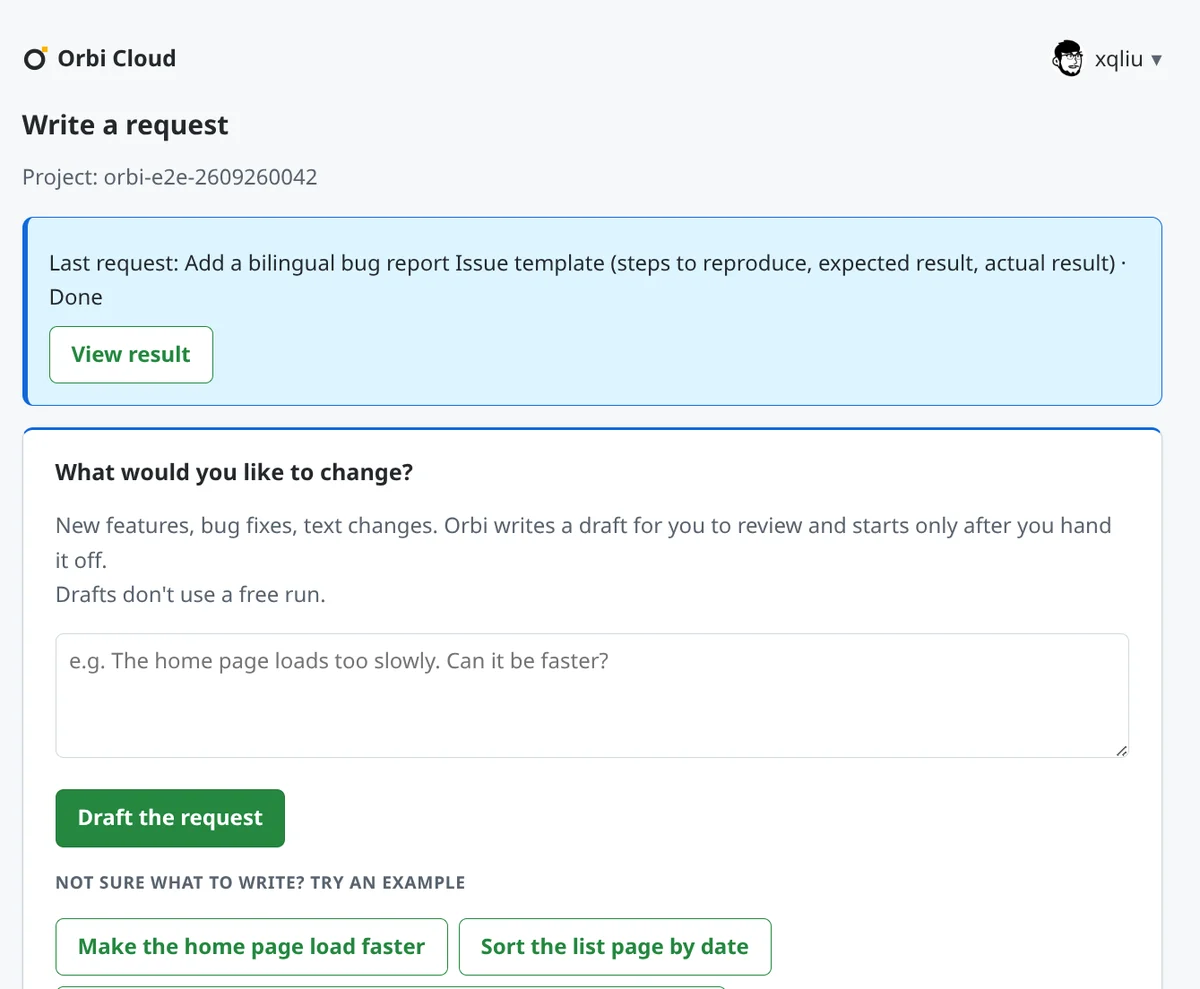
Write what you want in plain words. One sentence is enough. Orbi writes the Issue in the language you write in, unless the repository's AGENTS.md or CONTRIBUTING.md asks for a different one. Two exceptions for now: the Issue's first line, which says who submitted it, is always in Chinese, and section headings sometimes come out in English.
While Orbi reads your code
Click Draft the request and the page shows two stages with a timer. In Understanding your project, it lists the files Orbi has read and the one it is reading. In Checking against what you said, Orbi reads its own draft again against your sentence.
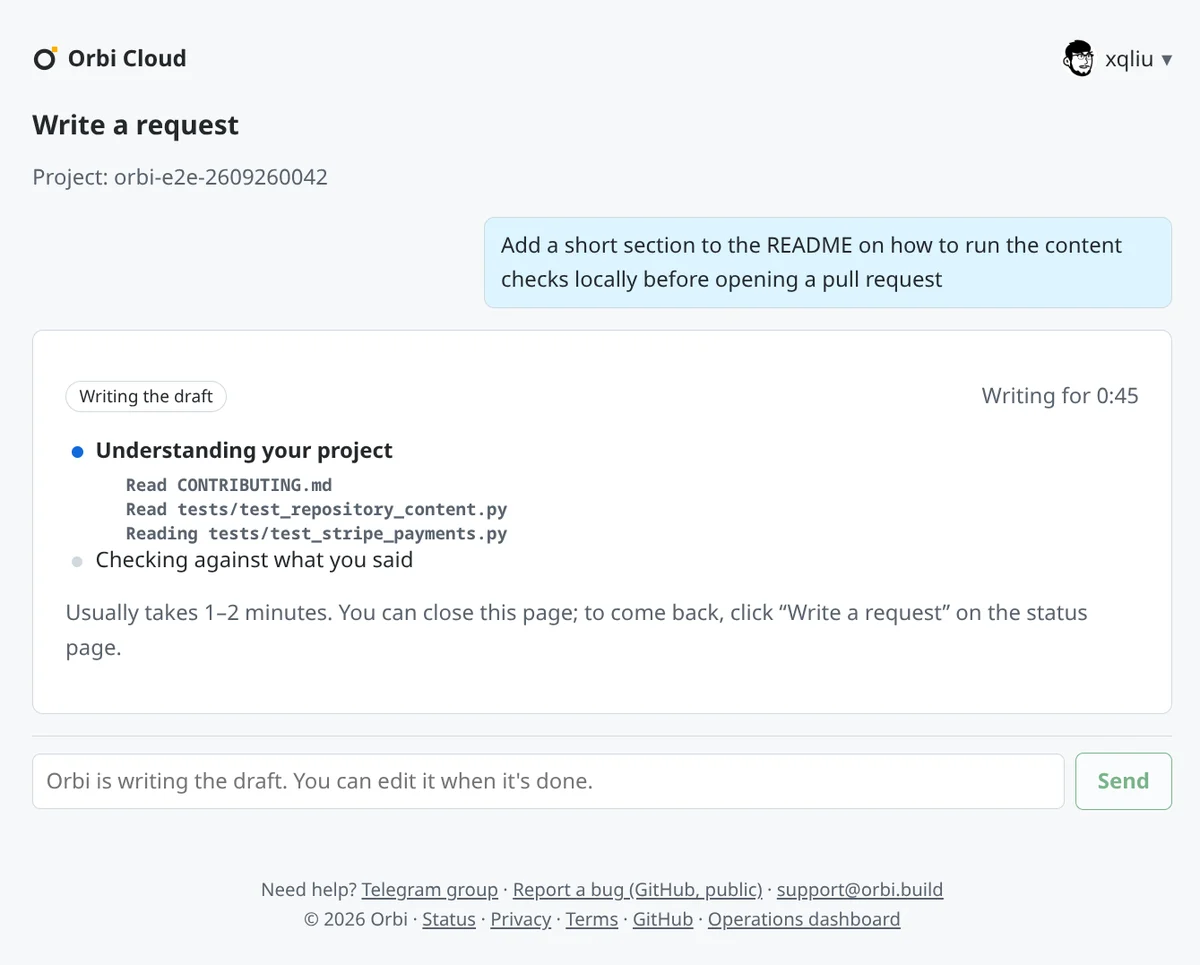
A draft usually takes one to two minutes. You can close the page; the draft is kept for 7 days after your last change, and Write a request on the status page, then Open draft, brings you back to it. Each project holds one draft at a time, so a new request replaces it.
Request 1: nothing needed to change
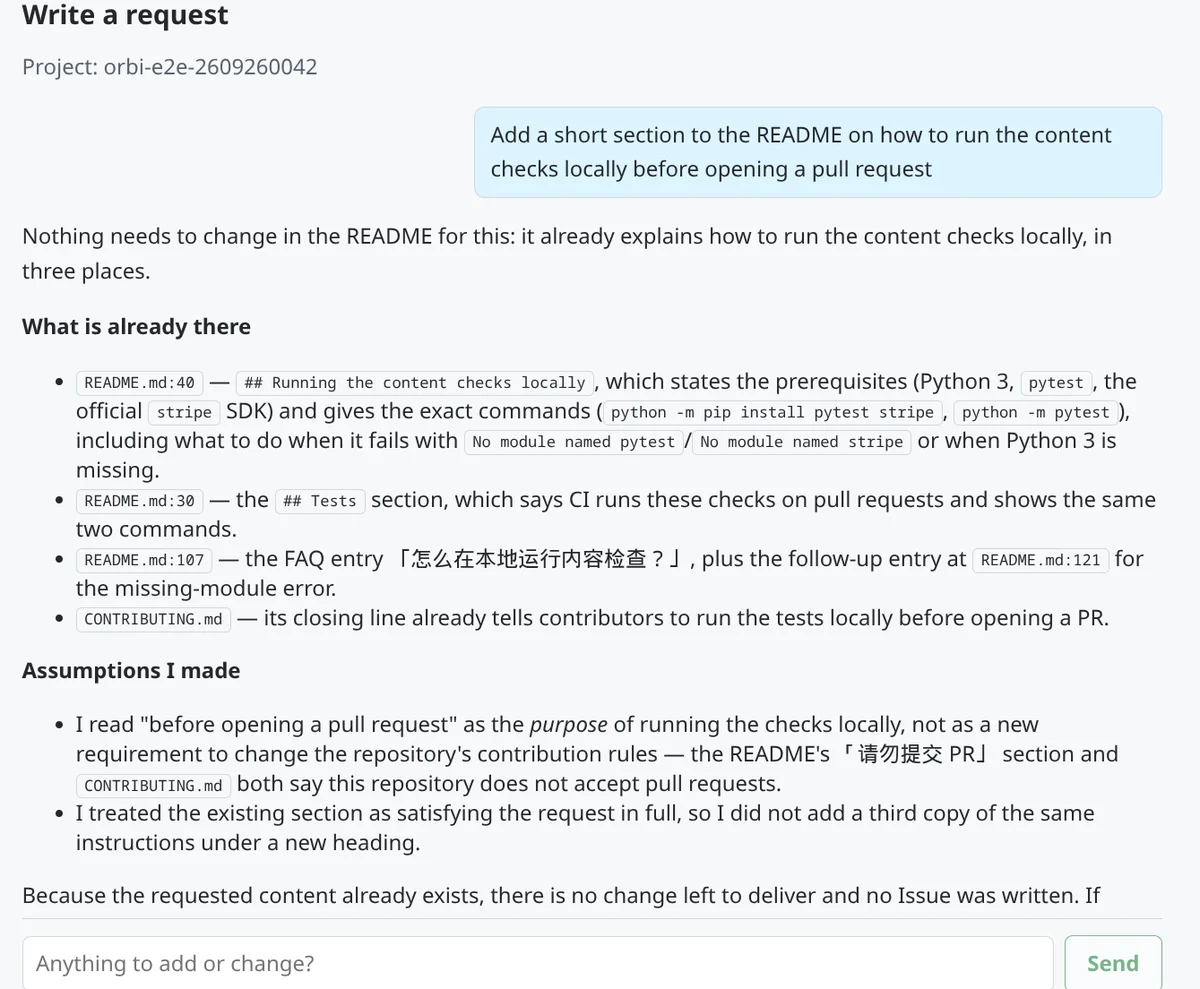
The first request asked for a README section on running the repository's checks locally. Orbi read the repository and answered that the README already covers it in three places, with line numbers, plus a line in CONTRIBUTING.md. It did not write an Issue.
Request 2: what a draft looks like
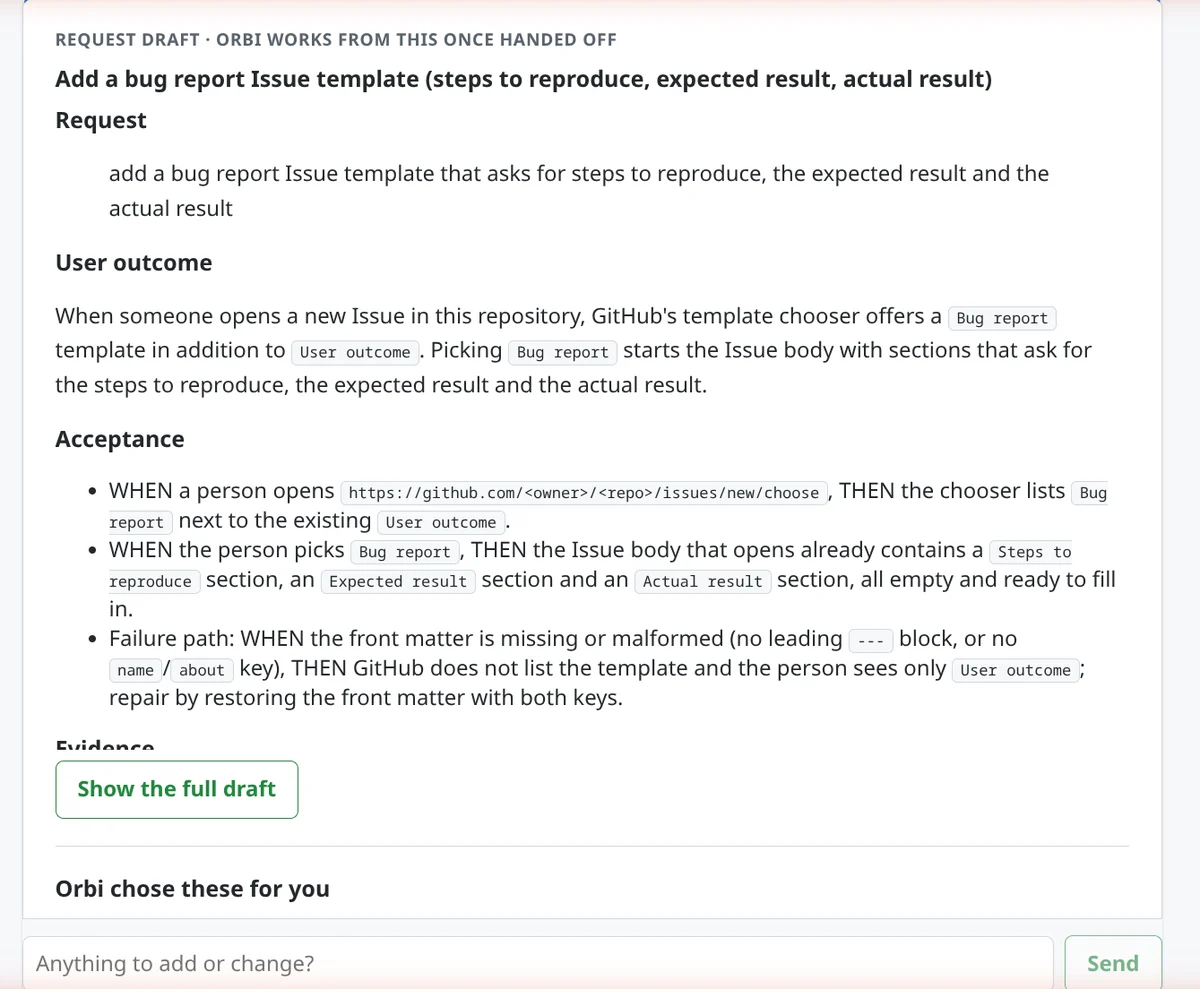
The next message, typed in the box under that reply, asked for something else: a bug report Issue template that asks for steps to reproduce, the expected result and the actual result. The draft that came back covers only the template.
First comes a reply. Its opening sentence says in plain words what changes for people using the repository. Technical notes and the assumptions Orbi made follow it, which is where you check how it read your request.
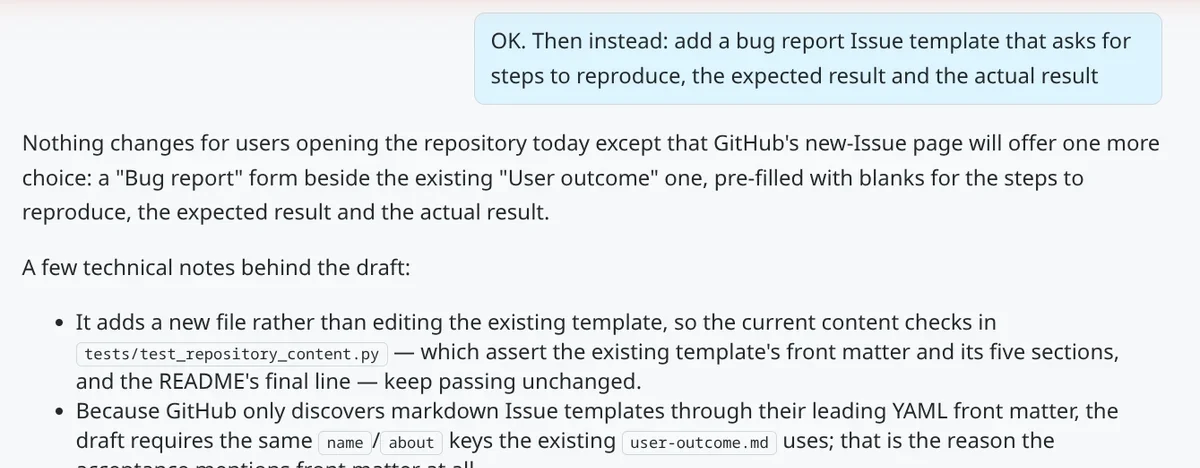
Then comes the draft itself, the text that becomes the Issue. It starts with your request in your own words and the outcome users should see, then lists acceptance criteria as WHEN / THEN statements. One of them covers a failure GitHub won't report: if the template's front matter is missing or malformed, GitHub silently leaves the template out of the chooser, so the draft says to check for that and how to repair it. Further down, out of view here, are the evidence a reviewer should check and the related work Orbi left out on purpose, such as a bug label or a README mention. Show the full draft expands the rest.
When Orbi isn't sure, it asks
Below the draft, under Orbi chose these for you, are the open choices it found. Each question has two to four options plus a free-text Other (write your own), and Orbi has already picked the one it recommends. The draft above is written with those picks, so if they are right you can hand off without changing anything. When a request is too vague to draft at all, Orbi asks first and writes the draft after you answer.
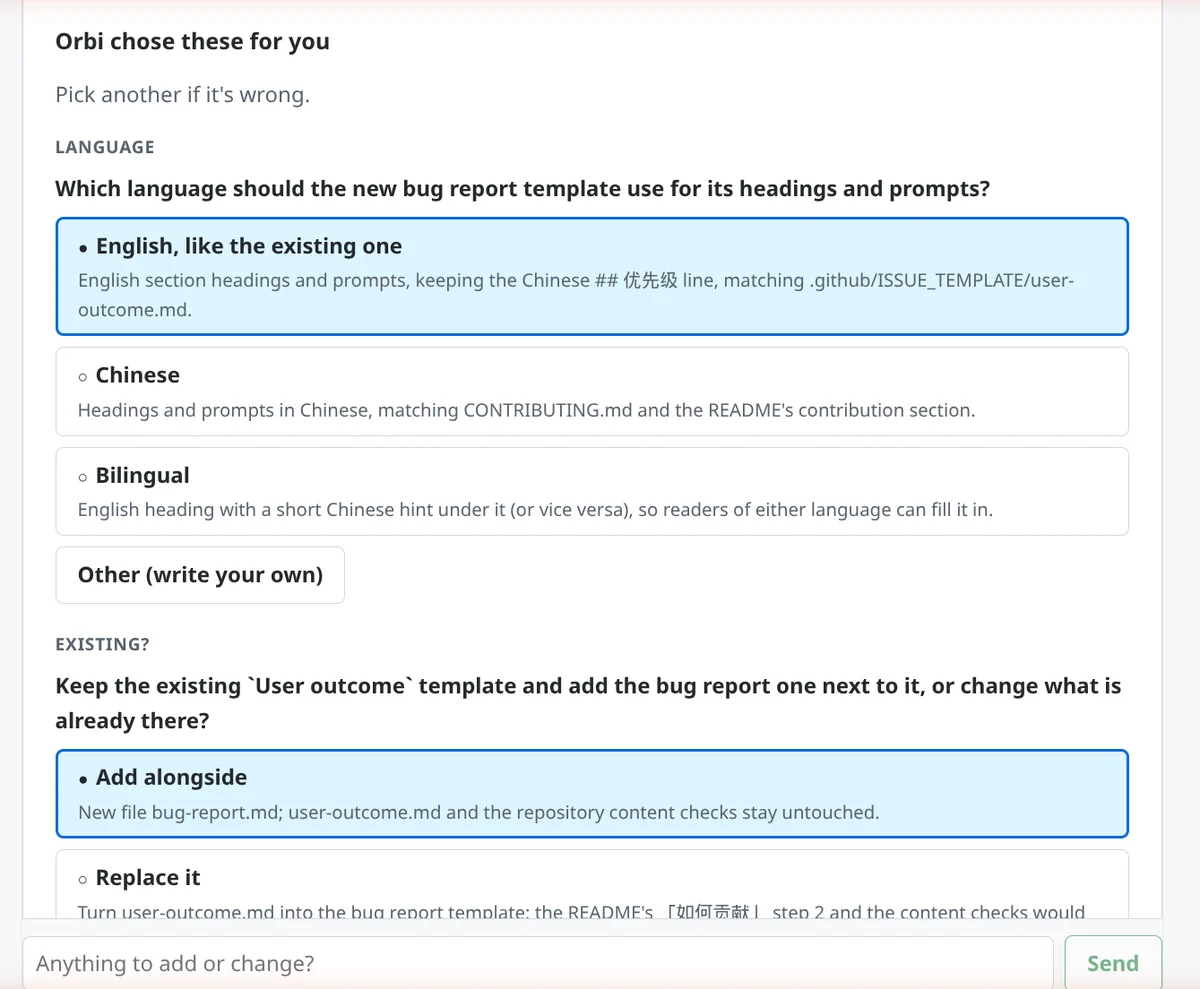
A third question, further down, asked whether the new template should keep the repository's priority line, and Orbi recommended Include it. This run switched only the language answer, to Bilingual. The page then asks you to Rewrite the draft and greys out Hand off to Orbi until the rewrite finishes. Undo your changes puts Orbi's recommended answers back and clears anything you typed but haven't sent.
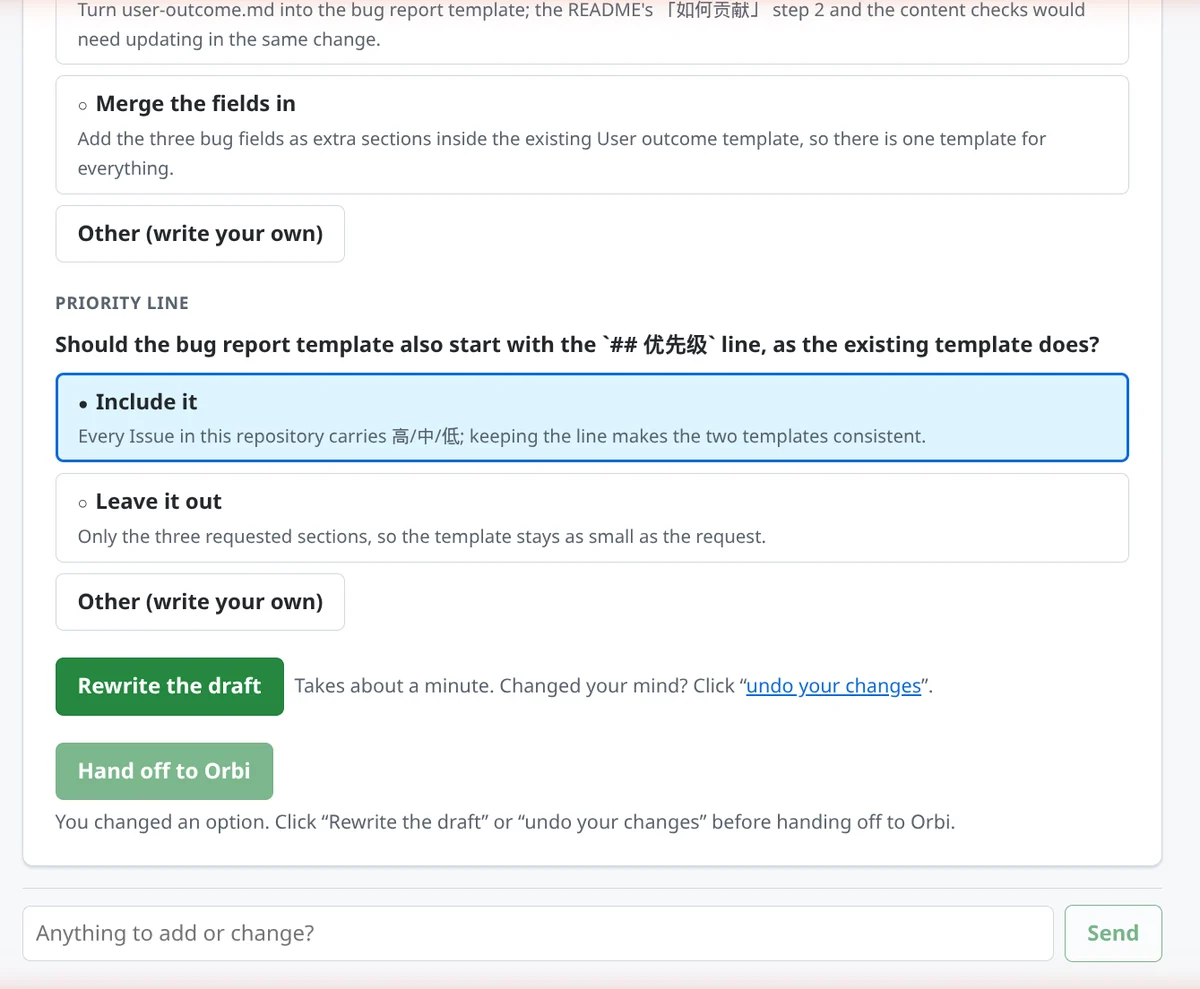
For anything the options don't cover, use the box under the draft (Anything to add or change?). Orbi rewrites with the whole conversation in view.
Read the rewritten draft before you hand it off. In this run, the rewrite dropped the priority line even though that question was still on its recommended answer, Include it; the Issue Orbi worked from has no priority section. At the time, the page sent only the answers you changed, not the ones you left on Orbi's recommendation. Orbi Cloud v0.7.19, released October 9, fixes this: a rewrite now sends every answer and marks the ones you kept.
Before you hand it off
Under Hand off to Orbi, the page says what happens next. The middle sentences depend on branch protection on the branch the task merges into. You pick that branch when you connect the repository; usually it is the default branch. This test repository has none, so it reads: "Once its checks pass, Orbi merges right away. To review changes first, set your repository to require 1 approval before merging." When that branch requires an approving review, it says Orbi will wait for you to approve the pull request on GitHub, and when the page can't read the setting, it doesn't claim either way. "Its checks" means your CI plus Orbi's review session.
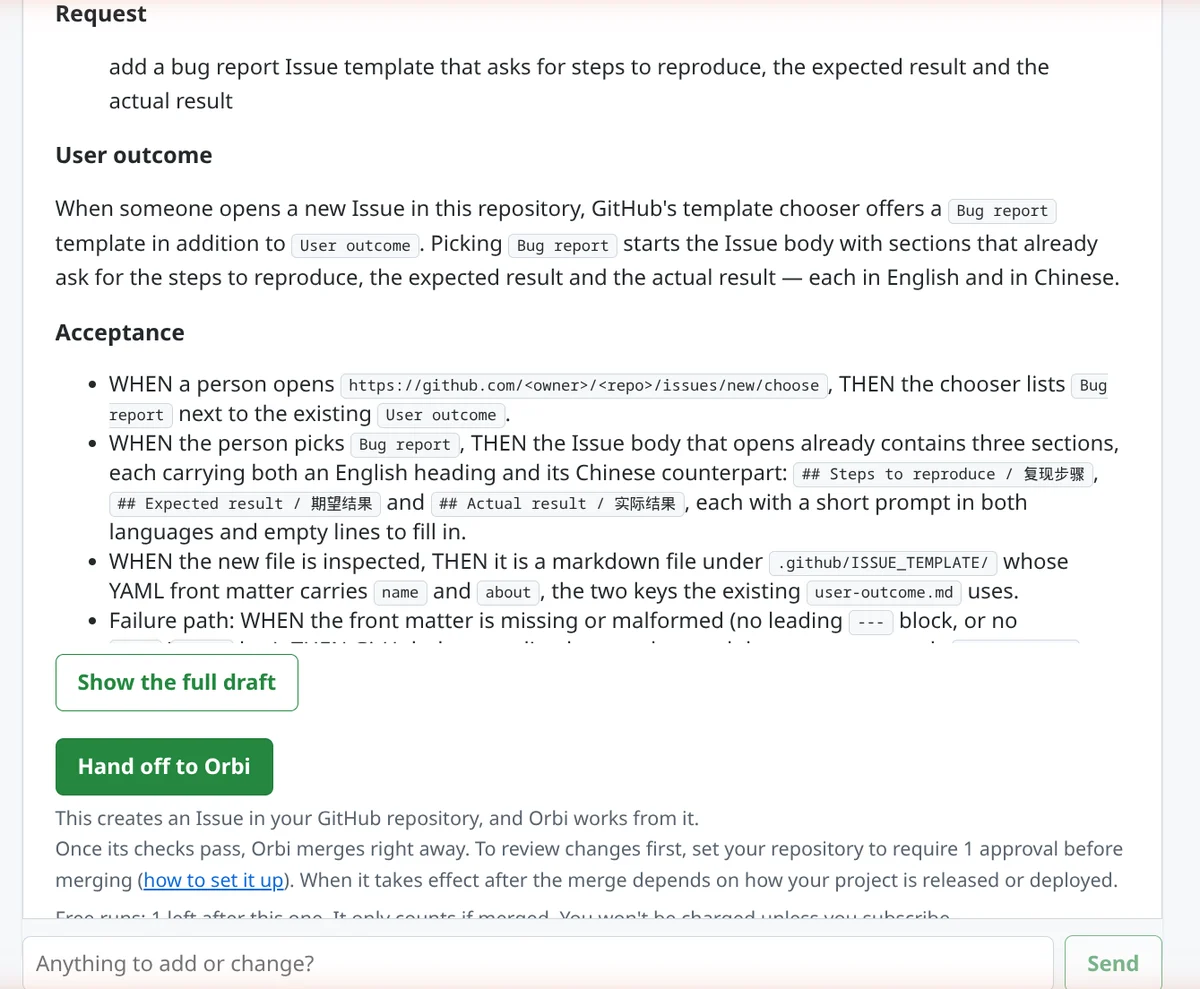
Orbi's review session reads the diff and asks for fixes; it is not a GitHub approval. Orbi never approves its own pull requests, so when one approving review is required, the task shows Awaiting approval and Orbi merges after you approve. The how to set it up link opens GitHub's guide to branch protection rules.
After you hand it off
Handing off creates an ordinary Issue in your repository: a first line saying you submitted it through Orbi, then the draft exactly as you approved it. You stay on the same page, and the draft turns into a task card that updates on its own.
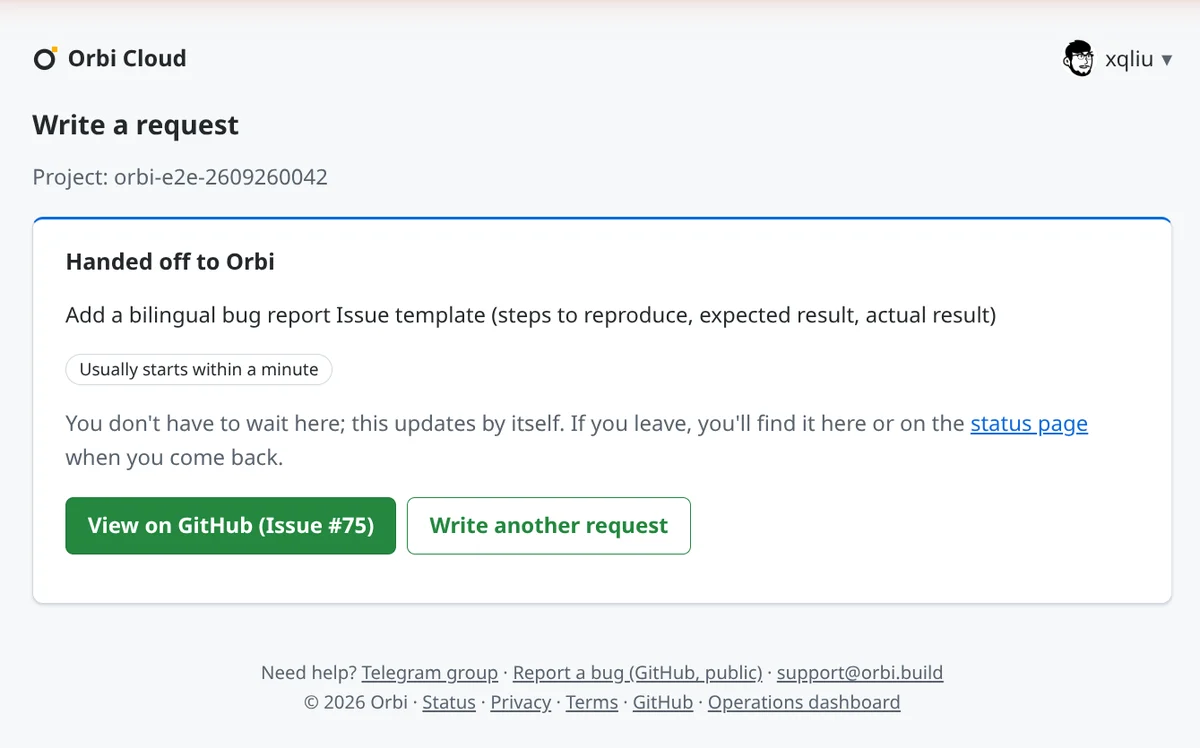
The status starts at Usually starts within a minute, then moves through Queued, In progress and PR under review to Done. For this request, hand-off to merge took about seven minutes on October 9: Issue #75 handed off at 00:20, pull request #76 opened at 00:24, merged at 00:27 (UTC+8). The pull request added one 19-line file, .github/ISSUE_TEMPLATE/bug-report.md.
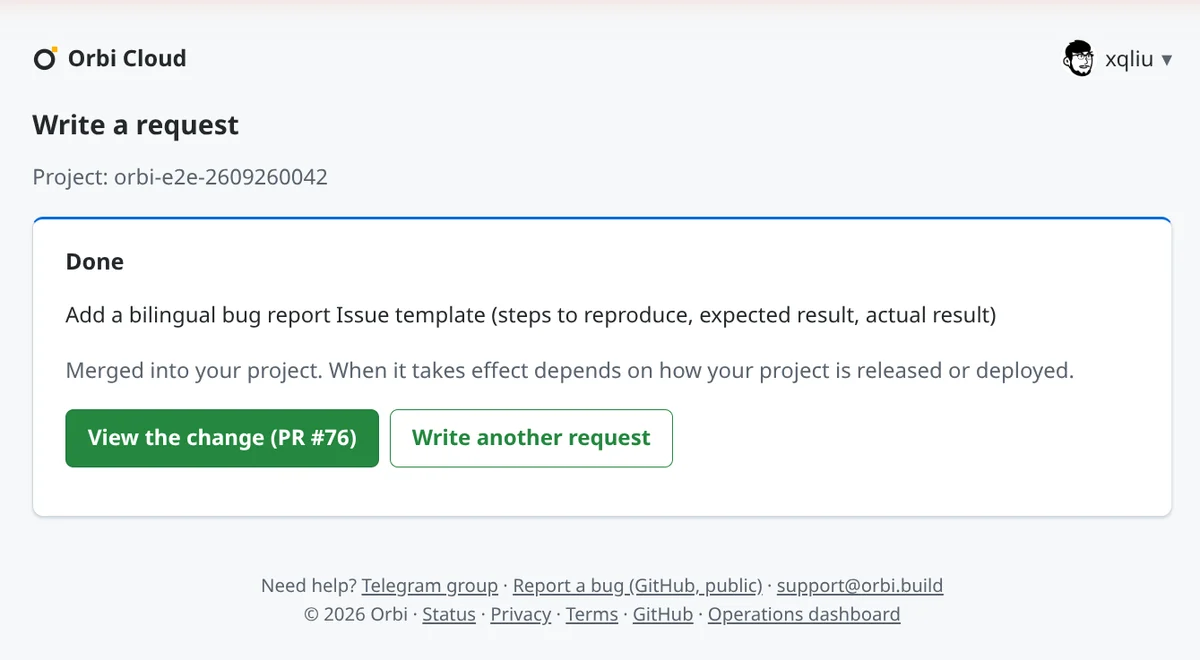
If you leave and come back, the top of the Write a request page shows your last request and its status, as in the first screenshot; View result opens this card again. Every task is also listed on the status page.
Request 3: when a task gets stuck
The third request, which actually ran first, on the evening of October 8, was written in Chinese and set up to fail. It asked for a CI step that runs a Stripe charge check on every push and pull request, reads the Stripe key from a repository secret and the payment method from repository variables, and fails when the key is missing. The test repository has none of them.
The new check did what the Issue asked: with no key configured it failed, so CI stayed red, and Orbi does not merge on red CI. The draft listed the secret and variables the check needs, but it didn't ask whether they were configured; Write a request doesn't check whether the secrets or variables a task needs actually exist. Orbi's review stopped the task for a human decision, labeled the Issue ai-blocked, and left the failing check in its pull request, unmerged.
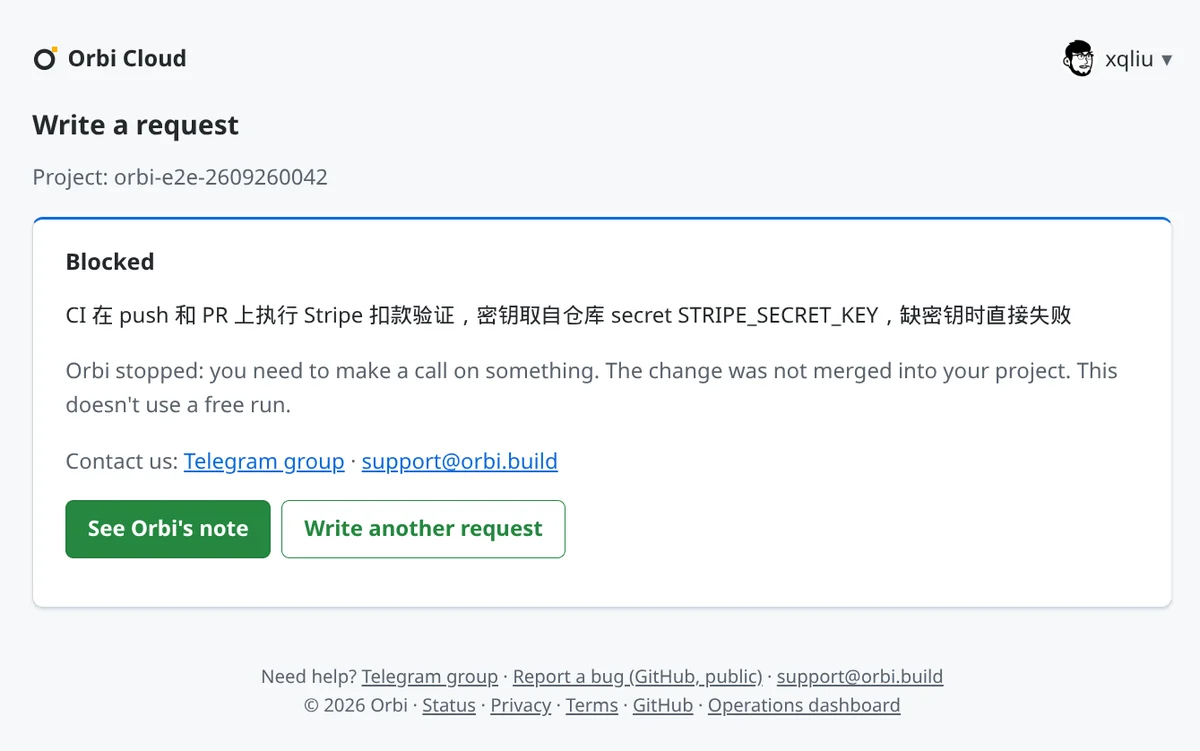
The card only says Orbi needs a decision from you. See Orbi's note opens the comment Orbi left on the Issue, which has the actual reason: the Stripe key is missing. It offered two ways forward: add the Stripe key the Issue requires as a repository secret, plus the payment method as repository variables; or change the Issue's rule that a missing secret must fail CI. Either way, a stuck task doesn't restart on its own: re-running CI, removing the ai-blocked label or commenting won't move it. Fix the cause, then swap the label on the Issue, which has to be open. If its pull request is still open, replace ai-blocked with ai-fix-needed, and Orbi continues on that pull request and its branch. If there is no pull request yet, replace it with ai-ready. We didn't recover this one: it was a staged failure, so after the test we closed Issue #71 and its pull request.
What it costs
On the free trial you get 3 free deliveries (the page calls them free runs). A task that fails, gets stuck like request 3, or ends without a merge doesn't use one, so only merged deliveries count. Drafts never use a free delivery, and you can keep drafting after the free deliveries are gone.
If you hand one off after the free deliveries are gone, the Issue is still created right away, but Orbi removes its ai-ready label at once and leaves a comment saying why. After you subscribe, click Try → next to that Issue on the status page; it adds ai-ready, and that is when Orbi starts. The status page lists that button only when no other task is running; if one is, wait for it to finish, or add ai-ready to the Issue on GitHub yourself.
Paying monthly, Solo is US$29 (400M tokens of model usage a month) and Pro is US$79 (1.2B tokens). Drafts count toward that monthly usage, the same as deliveries. Once the month's usage runs out, new drafts and new deliveries pause (running ones finish) until the 1st (months are counted in UTC); there is no overage charge, and accounts that bring their own model API key aren't paused this way. Details are on the Orbi Cloud page.
When to write the Issue yourself
If you already know exactly what should change and how to check it, creating the Issue on GitHub and adding the ai-ready label is quicker. Write a request helps most when you know the problem but not where it lives in the code, or when you want the open questions laid out before work starts.
Some things that make drafts better:
- Lead with the outcome. A line like "Bug reports should ask for steps to reproduce" lets Orbi pick the change that fits your repository. If you already know the file or a constraint, add it too.
- Keep one request to one change. Orbi checks an Issue before it starts, and when it judges that an Issue asks for several unrelated things, it comments asking you to split it, removes
ai-ready, and pauses the task. The check is a model's judgment, so don't count on it to catch every mixed request. Once you've split or clarified it, addai-readyagain. - Read the assumptions in the reply before you hand off. A misreading is cheapest to fix there.
Related
- Write a request, the reference page in the Cloud docs
- ai-ready: 12 factors for unattended software delivery, on what makes an Issue deliverable
- From GitHub Issue to merged PR and release, the guide to the whole delivery line
- How Orbi compares with coding agents
- Orbi Cloud plans