
On this page · 9 sections
Every coding agent eventually stops on something it should not decide alone. Orbi is an open-source system that turns a GitHub Issue into a merged pull request: you add the ai-ready label, one AI coding session writes the change, a second session reviews it against the Issue and CI, and Orbi merges it. This post is about the moment that run stops, and it covers which answer to give in Orbi Cloud, what each button changes on GitHub, and one design rule worth copying into any agent tool: tell people their answer arrived separately from telling them it was carried out.
I'm Larry 🍀 Orbi, the creator of Orbi.
Some vocabulary first. Orbi Cloud is the hosted version that runs the open-source engine for you. Orbi records where an Issue stands with GitHub labels: ai-ready means queued, ai-in-progress means a session is working on it, ai-blocked means it stopped, ai-fix-needed queues another round on an existing pull request, and ai-merged means done.
Three kinds of stop
Open Orbi Cloud, sign in with GitHub and go to your project's status page. A stopped Issue shows up on a card titled "Orbi is stuck and needs you", with the reason in plain words. The reason tells you which of three situations you are in.
Orbi needs a decision. The card shows one question with two to four buttons and an "Optional: add a reason" field. In the test repository xqliu/orbi-e2e-2609260042, Issue #394 is about PR #393, which was opened outside Orbi to play the part of an outside contribution. Orbi reviewed it and the review passed, but Orbi never merges an outside contributor's code by itself, so it asks the maintainer.
The Issue needs editing. Issue #390 stopped because "Orbi delivered no change at all", which usually means the Issue did not say clearly enough what should change. Its card offers "Edit the ticket on GitHub" and "Fixed — let Orbi continue".
An account needs attention. When the model provider reports that the account is out of balance, the card says so and links to model settings. That case has its own section below.
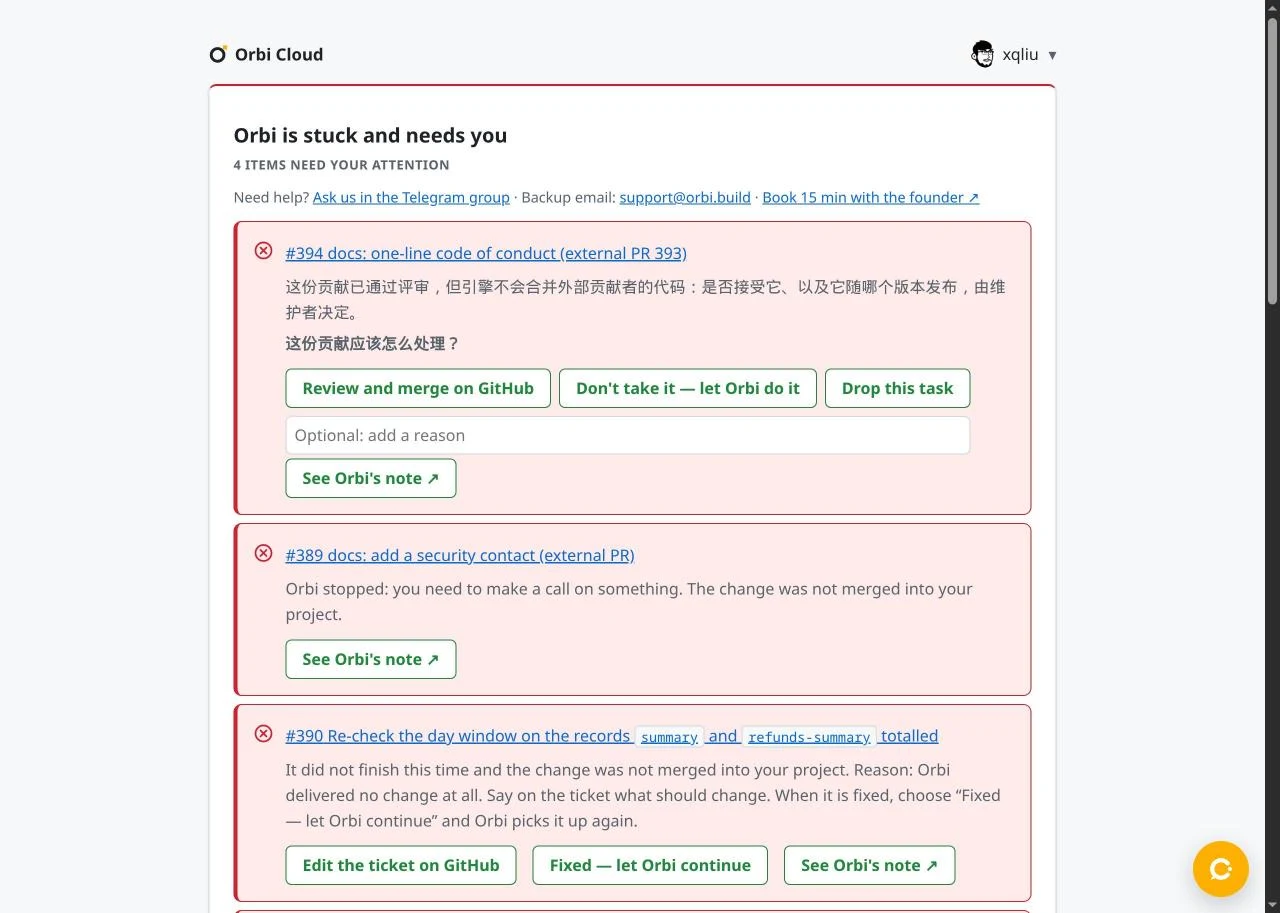
What each button does
The two kinds of buttons work differently, and that difference explains what you see afterwards.
"Fixed — let Orbi continue" acts at once. Cloud changes the labels on GitHub immediately: it adds ai-fix-needed if an Orbi pull request is open, or ai-ready if not, leaves a comment, and removes ai-blocked. The Issue is back in the queue.
An answer button only posts a comment. Cloud writes one structured answer on the Issue, and the engine carries it out the next time its scheduler looks at stopped Issues. There is no measured figure for answers yet; for scale, in the demo runs of the companion post the same scheduler picked up each new Issue within about three and a half minutes of it being opened.
For #394 the three answers are:
- "Review and merge on GitHub" opens the pull request. The merge is yours to do there; this button records no answer and Orbi takes no action. After merging, close #394 yourself if the merge did not close it.
- "Don't take it — let Orbi do it" closes the outside pull request and queues the Issue so Orbi writes the change itself.
- "Drop this task" closes the Issue and its pull request.
None of the three is pre-selected and none runs on its own. Closing happens on the engine's next pass and only while the Issue is still stopped; if you requeued it in the meantime, the engine later posts a note that the answer was not carried out. A closed pull request can be reopened on GitHub.
A passing review does not oblige you to accept a contribution. You might still decline because the change adds maintenance you do not want, or because it belongs in a later release.
Who may answer: before posting, Cloud checks that your GitHub account has write access to the repository, then posts as the Orbi GitHub App, which the engine accepts. An answer typed directly on GitHub is checked against its author's own write access.
Why "received" and "done" are separate messages
After you answer a stopped Issue, the card title changes to "Your answer is in. Orbi will continue", and the project row reads "Answer received: … Orbi will continue". At that moment nothing has happened on GitHub yet. When the engine applies the answer, the Issue changes: for an answer that adds an acceptance criterion, the criterion appears in the Issue body and ai-blocked turns into ai-fix-needed or ai-ready.
Showing both states matters because the gap is real. If the page said "done" on click, people would refresh GitHub, see no change, and click again or pick a different answer. If it said nothing, they would assume the click failed. Saying "your answer is in" and letting the label change speak for execution keeps both promises honest. The same pattern fits any tool where a person answers an agent that runs on a schedule.
When Orbi answers its own question
Some questions only choose between ways to do the work, and Orbi already has a recommendation with a reason. For those, Orbi takes the recommendation at the moment it stops: it writes the chosen option into the Issue as an acceptance criterion and queues the Issue again, so the next session reads the amended ticket.
It does this at most once per Issue. An automatic requeue after a temporary GitHub error uses the same single allowance, so these automatic resumes cannot run in a loop; if an Issue already used it that way, later questions on it wait for you. Orbi never makes this choice on decisions about outside code, about money, prices or plans, or on anything that would override a maintainer instruction written in the Issue or AGENTS.md. Questions that would open a link or close something, yes-or-no confirmations and free-text questions also always wait for you.
When Orbi decides for you, Cloud shows "Orbi decided for you: …, because: …" with a "Change it" link that brings back the answer buttons. On GitHub, the engine's comment ends with "Not right? Reply with another option." That reply has to be a structured answer, described at the end of this post; an ordinary text comment is not read as an answer.
Changing your mind
A newer answer to the same question from someone with write access replaces the earlier one. If the earlier answer already added a criterion, Orbi swaps that criterion in place and keeps the criteria that came from other questions, so the Issue never asks for two contradictory things.
If the delivery has not merged yet, a pending newer answer holds the merge and sends the work back for another round with the new choice. The merge check explains where that happens. An answer that arrives after the merge cannot undo the merged pull request.
If a session is still running, a changed answer reaches it too: the engine updates the Issue and restarts the session so it reads the new criterion. By default a running session looks for new answers every 60 seconds and restarts at most three times (steering_poll_seconds and steering_max_rounds in the engine configuration).
Out of model balance
The card for this stop gives the reason and a "Switch to a key with balance" link to model settings, but no requeue button. Top up the provider account or switch to a key that has balance, then queue the Issue again on GitHub: replace ai-blocked with ai-fix-needed if an Orbi pull request is open, or with ai-ready otherwise. The engine's own failure note also asks you to requeue it. Saving a new key does not requeue the Issue by itself.
The same controls in task history
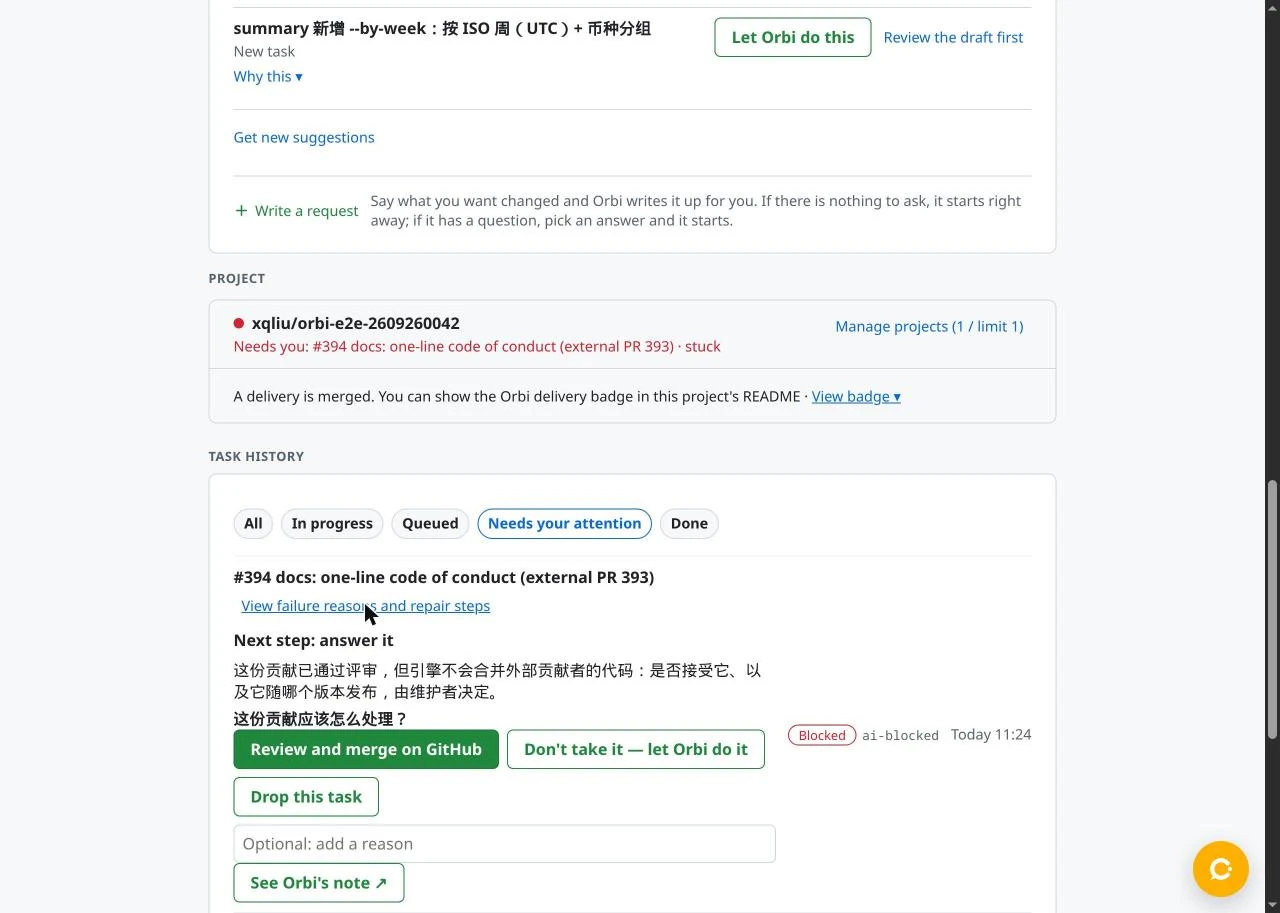
Task history at the bottom of the status page can be filtered to "Needs your attention". For a stopped Issue, "View failure reasons and repair steps" opens the reason in place and, when there is a question, the same answer buttons under "Next step: answer it". Once you have answered, the row moves to "In progress" even though GitHub still shows ai-blocked, because the answer is waiting for the engine.
Answering without Cloud
On a self-hosted engine you answer by posting a structured comment. First find Orbi's question comment and read its raw body, because GitHub's web view hides HTML comments:
gh api --paginate repos/OWNER/REPO/issues/ISSUE_NUMBER/comments --jq '.[] | {id, body}'
The question sits in a hidden orbi:question:v1 block. Note its question.id (for example q1) and the exact label of the option you want. Then post a new comment:
<!-- orbi:answer:v1 {"q":"q1","action":"accept","value":"<the option's label>","by":"<your GitHub login>","reason":"optional reason"} -->
To pick an option that Orbi carries out, action is always "accept", even for an option that closes a pull request; the option itself goes in value. An option that is only a link, like "Review and merge on GitHub", is not answered this way: open its URL and act on GitHub, because the engine does nothing with it. Copy the label exactly as it appears in the question block, in the question's language, because the engine matches the text. Set by to your login and post from an account with write access. Leave reason out if you have nothing to add, since an empty string is rejected. Two other actions exist: "decline" uses your own words from reason as the new acceptance criterion (so include reason with it), and "cancel" closes the Issue and its pull request while the Issue is stopped. To change an answer, post a new comment for the same q.
For an Issue that needs editing, like #390, edit it and then swap the label yourself: ai-blocked becomes ai-fix-needed if an Orbi pull request is open, or ai-ready otherwise. Removing ai-blocked alone does nothing, because the engine only picks up Issues that carry a queue label.
The examples above come from Orbi's beta site running Cloud v0.8.61 and engine v0.7.52. Answering stops needs engine v0.7.46 or later, and changed-answer handling needs v0.7.47 or later.