
On this page · 7 sections
When you ask an AI coding agent to fix a page, the hard part is often putting "what's wrong" into words, and a screenshot does it in one look. Orbi, an open-source system that turns a GitHub Issue into a merged pull request, lets you attach that screenshot to the Issue with orbi draft --attach since v0.7.59. This post walks through one real run, from the command to two merged pull requests, then covers where each file goes, what happens when one can't be read, and the limits.
I'm Larry 🍀 Orbi, the creator of Orbi.
The request I typed was one sentence: "Fix the two things circled in the screenshot on docs/receipt.html, styled per spec.html." Without the picture it says nothing. With the picture, anyone can see a grey button that looks disabled and an amount column whose decimal points don't line up. In an interactive tool you would paste that picture into the session: Claude Code takes an image by drag and drop, Ctrl+V, or a file path. With Orbi you confirm the draft in your terminal, and from then on nobody is in the session: the delivery and review run on their own. So the screenshot has to travel inside the Issue, and every session that touches the Issue has to look at it.
Attach a screenshot when you draft the Issue
orbi draft turns one sentence into Issues Orbi can deliver: it reads the repository, asks what it needs to know, writes the outcome and acceptance criteria, and creates the Issues when you press Enter. --attach adds a file to that draft, and you can repeat it:
orbi draft --attach screen.png --attach spec.html \
  "Fix the two things circled in the screenshot on docs/receipt.html, styled per spec.html"
The screenshot carried the request. screen.png was the receipt page with two red boxes: ① the "Download PDF" button is grey and looks disabled, ② the amounts aren't right-aligned, so the decimal points don't line up. spec.html was a short style note: primary buttons are #2563EB with white text and #1D4ED8 on hover, grey #9CA3AF is only for disabled buttons, amounts are right-aligned in tabular figures, and refunds are red #DC2626.
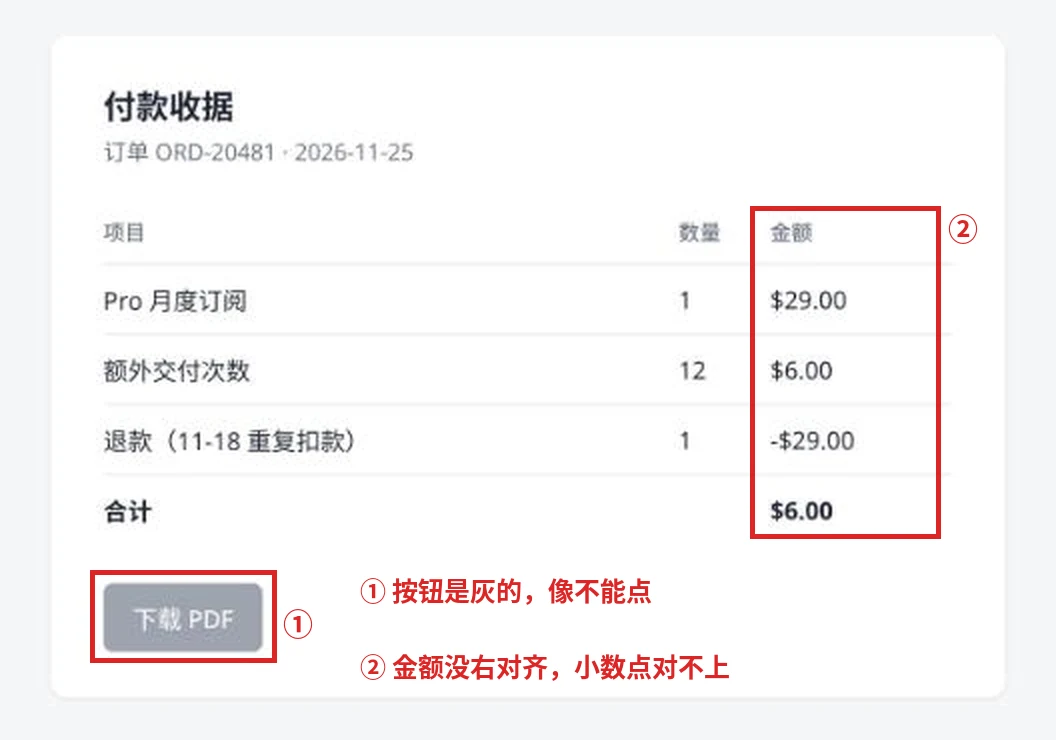
I ran this in a public test repository, xqliu/orbi-e2e-2609260042, against a small receipt page I added for the demo. Orbi asked no questions and came back with two Issues, because the two fixes can be accepted separately:
- #521: make the "Download PDF" button a primary button,
#2563EBwith white text and#1D4ED8on hover. - #522: right-align the header, each amount and the total in tabular figures, and show the refund row's
-$29.00in#DC2626.
Both came out of the attachments. The button colours and the hover colour are only in spec.html. "Looks disabled" and "decimal points don't line up" are only in the image. My sentence held neither.
One part went beyond what I circled. I hadn't marked the refund colour in the screenshot, and #522 includes it. The Issue says why under its assumptions: the screenshot only circled the alignment, but spec.html puts the red refund rule in the same amount-column section, so it was implemented too. That is the place to catch scope you didn't ask for, and the draft in the terminal shows it before anything is created. At the prompt, type an edit to drop it, or press Enter if the spec is right. Once created, the Issue is queued with ai-ready, so a later edit can race the delivery.
Where the files go: drafting, the Issue, delivery and review
Drafting. Each file is copied into the drafting session's own directory under a generated name (1.png, 2.html), so a file name can't point outside it. The session gets one line naming them (The person attached: 1.png = screen.png, 2.html = spec.html). It reads the HTML and text with its read tool. An image goes to the model as an image only when the model's catalog entry declares image input. The DeepSeek template Orbi ships declares it.
The Issue. When you confirm, each new Issue gets an ## Attachments section with only the files that Issue uses. A local image is uploaded through your own gh login (gh issue create --attach) and becomes a native GitHub attachment. An HTML or text file is written into the body as a collapsed block. With a model that can see images, anyone reading the Issue on GitHub sees what the agent will see.
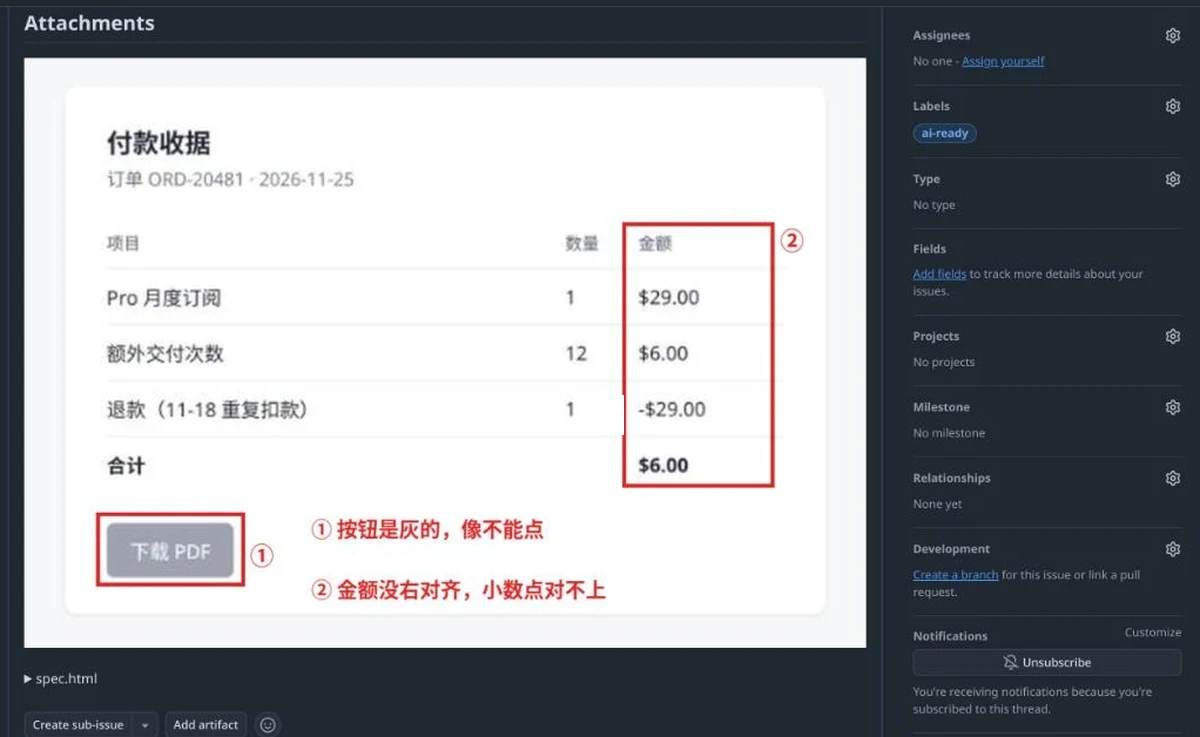
Delivery and review. The delivery session and the review session both receive the images from the Attachments section, and from native images in the body or in comments by people with write access. Review reads them again every round, so the reviewer checks the change against the same screenshot the coder worked from. The HTML and text are already in the Issue body that both sessions read. Images and links in comments from anyone else are never fetched.
What the delivery did with it
I ran the open-source engine on my own machine for this, the way a self-hosted install runs it, so the pull requests are opened under my own GitHub account. Both Issues were delivered and merged on 25 November (UTC):
- PR #523 for #521 changes the button's background from
#9ca3afto#2563EBand adds a.btn:hoverrule with#1D4ED8. Delivery started at 02:33, one review round passed, merged at 02:50. - PR #524 for #522 adds right alignment and
tabular-numsto the amount cells, and#DC2626to the refund cell. Delivery started at 02:39 and merged at 03:08, after three review sessions: the first ended with a malformed verdict and was retried; the next found no problems, but CI failed after the branch took in #523 frommain; the last fixed the failing test itself, since a review session fixes what it finds, and passed.
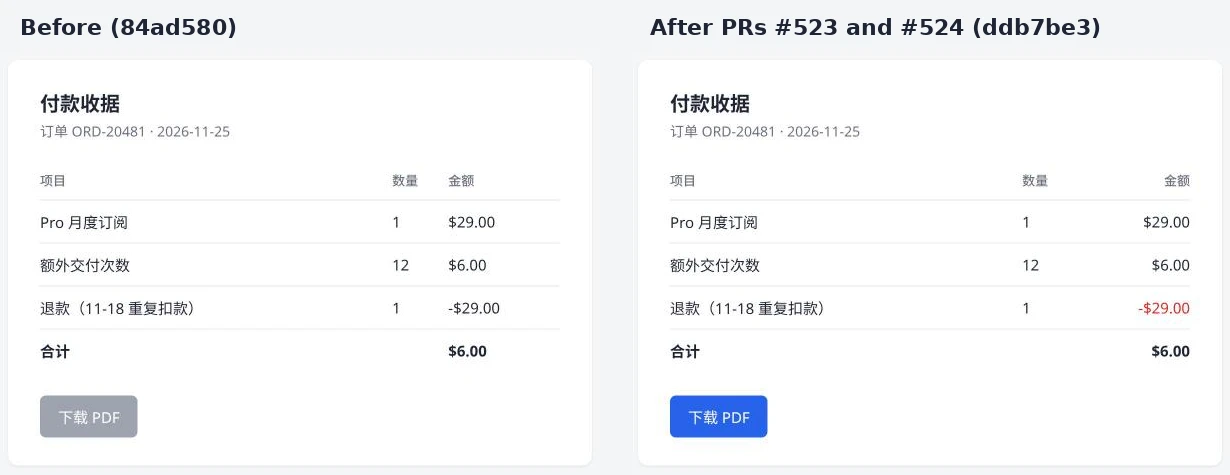
Every session got the screenshot. The session logs of all six sessions, the two that wrote code and the four review attempts, each carry the image, fetched again for every one of them.
When a file can't be read, Orbi stops
An attachment is often the request itself. If the coder skipped screen.png, it would have "fix the two things circled" and no circles, and it would write something. The review session would then judge that something without the screenshot either. So Orbi stops:
- In drafting, a file it can't read fails the round and names the file.
- In delivery or review, the session doesn't start. The Issue gets
ai-blockedand one comment naming the image and the fix: upload it again (or remove it, if the request doesn't need it), then swapai-blockedforai-ready(orai-fix-neededwhen a pull request is open). On a private repository, that fix needs v0.7.63 or later; see the limits below. Later runs don't retry it on their own, so a broken image doesn't post a new comment every few minutes.
Two cases don't stop, and they're worth knowing:
- The upload is refused. If
ghrefuses an upload, for example because it's signed in with a GitHub App token instead of your own account, the Issue is still created without that image, and the command prints which images didn't upload. Takeai-readyoff the Issue, paste them into it on GitHub, then putai-readyback. A delivery that already started before you did this won't see them. Drafting again aftergh auth logincreates a new Issue, so close the one without the image if you go that way. - The model can't see images. In drafting, a model that doesn't declare image input is told the image can't be viewed and to ask you to describe it when it matters. In delivery and review, such a model gets no image and no notice: the session runs on the Issue text alone. If the screenshot matters, run Orbi with a model that declares image input, like the DeepSeek template it ships.
Limits and what you need
Swipe horizontally to see all columns.
| Images | png, jpg, jpeg, gif, webp |
|---|---|
| HTML and text | html, htm, txt, md, csv, tsv, json, log |
| Count and size | at most 10 files, 10 MB each; all HTML and text together at most 50,000 characters, so it fits in the Issue body |
| Model | for delivery and review, one that declares image input, like the bundled DeepSeek template; otherwise the screenshot is ignored without notice |
| Anything else | refused with the reason, for example a PDF or a video |
| Orbi | v0.7.59 or later (github.com/orbi-build/orbi); v0.7.63 or later for delivery on a private repository |
| gh | 2.99 or later, signed in as a person (gh auth login) |
--attach applies when a draft starts. Amending an existing Issue carries no attachments, so for an Issue that already exists, paste the image into it on GitHub instead.
Two cautions. On a public repository, everything you attach is public: the images, and the HTML and text written into the body (collapsed is not hidden). Remove anything private before you attach it. And on a private repository, delivery before v0.7.63 couldn't read the native images Orbi uploads: the address it fetched still needed a login, so the delivery stopped with attachment_unavailable. v0.7.63, released on 25 November, fixes it (orbi#2388, for orbi#2387); if you run Orbi yourself, upgrade. Drafting and filing have worked on private repositories since v0.7.59; the run above was on a public one.
How this compares
Putting the screenshot in the Issue isn't new. GitHub Copilot's cloud agent reads screenshots dropped into an Issue body, and gh 2.99 added --attach for anyone. Orbi uses that same upload. What it adds is in the steps around it. The drafting session reads the files before it writes the Issue, so the outcome and acceptance criteria come from what's in the screenshot and the spec. The review session reads them again every round. And when an attached file can't be read, the run stops and says which file, instead of carrying on with half the request.